



Front-End Technologies for Modern Development: A Practical Guide for 2025

- Why Front-End Technologies Matter More Than Ever
- What Are Front-End Technologies?
- The Core of Front-End: HTML, CSS, JavaScript
- Popular JavaScript Frameworks and Libraries
- Modern Front-End Tooling & Build Systems
-
Front-End Architectures and Concepts
- Micro Frontends: Scaling Teams and Projects
- Monorepos: Keeping Things Organized
- SSR/SSG vs CSR: Choosing the Right Rendering Strategy
- Designing Modern Front-End Architecture: A Smarter Approach
- How Front-End Teams Work in the Headless Ecosystem
- Why Front-End Teams Love Headless CMSs
- What Is a Native Headless Frontend?
- APIs Are the Glue That Holds It Together
- What’s New: Front-End Tools Gaining Momentum in 2025
- Flutter Web and React Native Web: Cross-Platform UIs
- Web3 Front Ends: Still Niche, but Growing
- Three.js, WebGL & the Rise of 3D Interfaces
- When to Embrace These Emerging Technologies
- Wrapping Up
- The Front-End Tech Stack Is Evolving — Stay Smart
Today’s users expect more than just a working website—they expect instant load times, smooth interactions, and visually polished interfaces across every device. For startups and digital teams, that means your front-end stack isn’t just about code—it’s a business decision.
Whether you’re building a SaaS dashboard, marketing site, or eCommerce experience, the technologies you choose will directly affect performance, user retention, SEO, and ultimately conversions. A slow or clunky interface can kill engagement. A fast, responsive frontend can turn casual visitors into paying users.
This guide explores the front-end technologies shaping 2025—from core building blocks to modern frameworks—so you can make smart, future-ready choices for your next product or redesign.
Why Front-End Technologies Matter More Than Ever
Modern users expect a seamless experience — and they expect it now. A slow-loading, clunky, or outdated interface isn’t just frustrating — it’s a conversion killer. According to Google research, if a page takes longer than 3 seconds to load, over half of mobile users will abandon it. That’s money walking out the door.
From a business perspective, the front end is more than just the visual layer. It’s a key performance driver. Optimized front-end code improves site speed, boosts SEO rankings, and keeps bounce rates low. Smooth UX, on the other hand, increases time on site, user satisfaction, and customer retention.
Front-end technologies are what power all this. They translate design into live experiences. They connect your backend data with your customers. And they allow development teams to move faster through modular systems and component reuse.
As we look ahead to 2025, the role of the front end in software development is only growing. With trends like headless architecture, micro frontends, and real-time data-driven UIs on the rise, investing in the right tools — and the right team — is no longer optional.
What Are Front-End Technologies?
When people interact with your website or app, everything they see and click—from layout to buttons to animations—is the result of front-end work. It’s where design, development, and usability meet.
The front end represents the visible layer of your digital product, built using tools and frameworks that handle structure, styling, and interactivity. While it works hand-in-hand with the backend (which powers things like databases and logic), the front end is what brings those systems to life for real users.
Front-end work isn’t just about appearance. It’s about how fast a site loads, how smoothly it behaves, and how easy it is to use for people on any device — from desktop monitors to mobile phones.
In a typical web application, the front end plays one half of the role. It communicates with the backend, pulling in data and presenting it in a clear, interactive way. Here’s a simplified breakdown of how these layers work together:
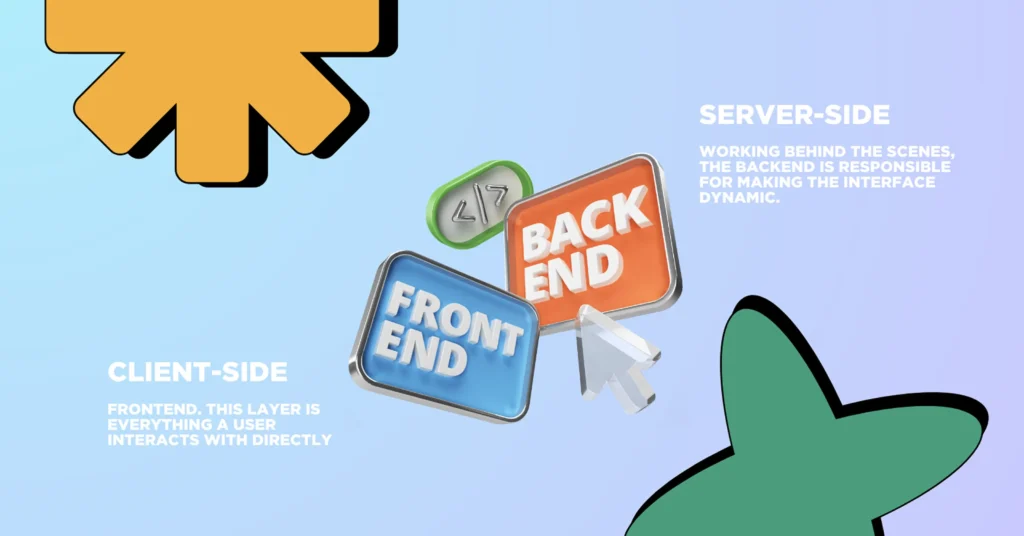
- Client-Side. This layer is everything a user interacts with directly — from page layout and typography to dropdowns, animations, and navigation. It’s what defines how the site feels. Most of the visual and interactive elements are created using a mix of HTML, CSS, and JavaScript, often enhanced by frameworks such as React, Vue, or Svelte to streamline development and enable richer UI behavior.
- Server-Side. Working behind the scenes, the backend is responsible for making the interface dynamic. It handles processes like saving form data, authenticating users, querying databases, and managing logic. Technologies often used here include Laravel for PHP, Node.js for JavaScript environments, and Django for Python-based stacks — each chosen based on the project’s needs and complexity.
Together, these two sides create a full digital experience. But it’s the front end that delivers the first impression — and often determines whether users stay or bounce.
Understanding front-end technologies means understanding how this layer serves as the bridge between your product’s value and the end user’s experience. Whether you’re building a landing page, an admin dashboard, or a cross-platform web app, the tech stack you choose for your front end will define how fast, stable, and scalable your product feels.
The Core of Front-End: HTML, CSS, JavaScript
Before you explore advanced frameworks and bleeding-edge tools, it’s essential to master the building blocks: HTML, CSS, and JavaScript. These three technologies still form the backbone of every front end — and they’re just as relevant in 2025 as they were a decade ago.
HTML: The Structure
HyperText Markup Language (HTML) defines the structure of every webpage. It tells the browser what content exists — headings, paragraphs, buttons, forms, images, and more. HTML is semantic, meaning each tag carries meaning and helps with accessibility, SEO, and maintainability.
Even when you use React, Vue, or Webflow, you’re ultimately generating HTML under the hood.
CSS: From Styling Pages to Structuring Interfaces
Today’s CSS goes far beyond setting fonts and background colors. Features like flexbox, CSS Grid, variables, and now container queries let developers craft responsive, scalable layouts without relying on JavaScript hacks or third-party plugins.
If you’re building a design system or working on a UI that needs to adapt across screen sizes, CSS now gives you the precision to handle it directly. And with the help of preprocessors like Sass or utility-first tools like Tailwind CSS, teams can move faster without compromising structure or readability.
JavaScript: Making Interfaces Feel Alive
JavaScript turns static interfaces into real applications. Whether it’s managing form validation, fetching data from an API, or building a seamless single-page experience, JS is the logic layer that keeps users engaged.
A few key things JavaScript enables on the front end:
- Handling user interaction without full-page reloads
- Making real-time updates (think: chat, stock tickers, dashboards)
- Managing dynamic routing in single-page applications
- Connecting with backend APIs for everything from authentication to content loading
And let’s be clear: if you’re working with React, Vue, Svelte, or Angular, you’re building on top of JavaScript. These frameworks amplify what JS can do — they don’t replace it.
Why HTML/CSS/JS Alone Aren’t Enough Anymore
Sure, you can build a decent landing page with just the basics. But for anything more ambitious — say, a real-time dashboard, a SaaS interface, or an eCommerce frontend — raw HTML/CSS/JS quickly becomes limiting.
That’s when you start needing:
- Component-based structure
- State management
- Build tooling
- Typed codebases
- Scalable routing and layout systems
The next layers of modern front-end development bring those missing pieces. If the “core trio” is your foundation, the tools we’ll cover next are the walls, roof, and plumbing.
Popular JavaScript Frameworks and Libraries
Modern front-end development isn’t just about JavaScript anymore — it’s about choosing the right framework that balances performance, scalability, and developer experience. In 2025, a few clear leaders continue to dominate the landscape, each with unique strengths and ideal use cases.
A Reliable Workhorse for Complex Interfaces
React has become a cornerstone of front-end development, widely adopted by startups and large tech companies alike. Built around reusable components, it enables developers to build complex, interactive UIs in a structured and maintainable way.
Why teams choose React:
- Well-supported ecosystem including tools like Next.js and React Native
- Active developer community and strong talent availability
- Supports SEO through frameworks with server-side rendering
- Works great for interactive dashboards, MVPs, and apps that scale over time
React is especially useful when building products intended to grow in complexity—whether that’s integrating with a headless CMS, launching a startup MVP, or building out custom workflows.
Vue: Fast, Friendly, and Efficient
Vue is often described as approachable yet powerful. It’s known for its simplicity, especially compared to heavier frameworks, and is a favorite among developers looking for rapid development without a steep learning curve.
Where Vue excels:
- Clear syntax and strong documentation
- Lightweight performance with real-time responsiveness
- Ideal for teams with limited resources or tight deadlines
- Flexible enough for both small websites and scalable single-page applications
Vue’s Single File Components (SFCs) and out-of-the-box reactivity make it a solid pick for startups aiming to ship quickly while keeping codebases clean.
Angular: Enterprise-Level Structure
Angular is a full-featured framework built for large-scale applications. It comes with everything out of the box: routing, state management, form handling, and strict typing via TypeScript.
Why use Angular:
- Enterprise-grade architecture
- Dependency injection, testing tools built-in
- Scalable for teams working on long-term codebases
Best for: Large B2B platforms, regulated industries, internal tooling where code stability matters.
Svelte & SvelteKit: Compiler-First Innovation
Svelte takes a radically different approach — instead of shipping a framework to the browser, it compiles down to highly optimized vanilla JS. This results in smaller bundle sizes and faster performance out of the box.
Why use Svelte:
- Minimal runtime = better load times
- Reactive syntax built into HTML-like markup
- SvelteKit provides routing, API endpoints, and SSR
Best for: High-performance landing pages, marketing sites, or early-stage MVPs where speed and bundle size matter.
When to Use Which?
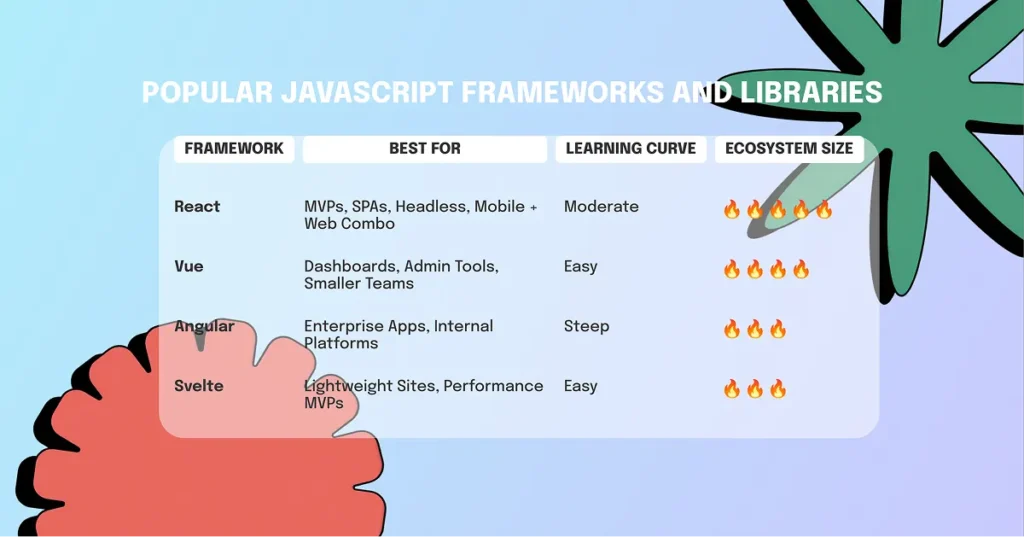
| Framework | Best For | Learning Curve | Ecosystem Size |
| React | MVPs, SPAs, Headless, Mobile + Web Combo | Moderate | 🔥🔥🔥🔥🔥 |
| Vue | Dashboards, Admin Tools, Smaller Teams | Easy | 🔥🔥🔥🔥 |
| Angular | Enterprise Apps, Internal Platforms | Steep | 🔥🔥🔥 |
| Svelte | Lightweight Sites, Performance MVPs | Easy | 🔥🔥🔥 |
Frontend development in 2025 is about choosing the right technology for your specific needs — not the trendiest tool on the market. Whether you need speed, structure, or ecosystem, these frameworks offer modern solutions for building great user experiences.
Modern Front-End Tooling & Build Systems
Writing front-end code is just the beginning. To ship fast, clean, and scalable applications in 2025, developers rely heavily on modern tooling. These tools handle bundling, transpiling, type-checking, and code formatting—streamlining the entire workflow from first line of code to production deployment.
Build Tools and Bundlers: Vite, Webpack, Parcel
Bundlers take your source code and optimize it for the browser. They combine multiple files into fewer, minified bundles—essential for performance.
- Vite is now the preferred choice for most modern frameworks (Vue, React, Svelte). It offers lightning-fast dev servers, hot module replacement, and minimal config.
- Webpack remains powerful but requires more setup. It’s still widely used in enterprise projects.
- Parcel is ideal for small teams or quick setups. Zero-config and fast out of the box.
Why it matters: Good bundling and live-reloading drastically improve developer productivity and output quality.
TypeScript: Writing Safer JavaScript
TypeScript has become the de facto standard for large-scale front-end projects. By adding strong typing to JavaScript, it reduces bugs, improves code clarity, and helps teams work better together.
- Scales well across large teams and codebases
- Great support in editors like VSCode
- Supported natively in most modern frameworks
Tip: Even if you don’t use it everywhere, adopting TypeScript for shared components or API layers pays off quickly.
Code Quality Tools: Babel, ESLint, Prettier
Maintaining a consistent and clean codebase becomes easier with tools that enforce structure and formatting automatically.
- Babel allows you to use next-gen JavaScript features without worrying about browser compatibility.
- ESLint enforces coding best practices and prevents common mistakes.
- Prettier keeps code style consistent across the team—no more formatting debates.
These tools are typically integrated into your development pipeline and run on every commit or pull request, helping you avoid issues before deployment.
Why This Stack Matters in 2025
Speed and performance are non-negotiable, but so is developer experience. A modern front-end build stack ensures your apps are optimized for users—and that your team can ship confidently without firefighting bugs later.
Modern CSS and UI Frameworks: Building Interfaces with Speed and Consistency
Front-end in 2025 is no longer just about getting things to work—it’s about creating responsive, accessible, and visually coherent experiences without wasting time on repetitive styling. This is where modern CSS and UI frameworks make a difference. They bring structure to design systems and speed up development across small projects and enterprise-level apps alike.
Tailwind CSS: A Utility-First Approach to Styling
Tailwind CSS has changed how many teams write styles. Rather than crafting CSS files from scratch, developers apply utility classes directly in the markup. It’s fast, predictable, and removes much of the back-and-forth between CSS and HTML.
Why it works:
- Encourages consistency in spacing, color, and layout
- Reduces the need for naming custom classes
- Plays well with design systems and component-based frameworks
- Offers full customization through configuration files
For startups and fast-moving teams, Tailwind is especially useful—build layouts, test variations, and push to production without ever opening a CSS file.
UI Component Libraries: Speed Without Sacrificing Quality
While Tailwind gives you control over layout and design, component libraries like Chakra UI, MUI (Material UI), and Radix UI offer pre-built elements—buttons, modals, inputs, and more—designed to be accessible and theme-ready out of the box.
These libraries help teams:
- Maintain visual consistency across large projects
- Move faster by reusing components
- Ensure accessibility (a11y) without manual work
- Adapt to dark mode, responsiveness, and brand styles easily
Design tokens, spacing systems, and atomic components are no longer “nice-to-haves”—they’re essential for scalable front-end application development.
In short, CSS and UI frameworks are no longer tools for saving time—they’re part of a larger strategy to build maintainable, scalable, and high-performing user interfaces. Whether you’re building an MVP or refactoring a legacy UI, integrating the right frameworks can dramatically improve both speed and quality.
Front-End Architectures and Concepts
Front-end development has evolved beyond building single-page apps or static sites. As applications grow in scale and complexity, architecture choices become critical. From how your codebase is organized to how the frontend is rendered, the right setup can improve performance, simplify collaboration, and reduce deployment pain.
Let’s explore the key architectural trends shaping front-end application development in 2025.
Micro Frontends: Scaling Teams and Projects
Micro frontends apply the microservices philosophy to the user interface. Instead of building one monolithic front end, you split your app into independently deployable UI modules—each owned by different teams.
Why it matters:
- Enables parallel development and faster feature releases
- Reduces conflicts across large codebases
- Supports incremental adoption of new tech stacks
Micro frontends are a natural fit for enterprise-scale apps with multiple teams and domains. Frameworks like Module Federation (Webpack 5) and tools like Single-SPA make orchestration easier.
Monorepos: Keeping Things Organized
A monorepo is a single repository that houses multiple projects—often frontend + backend, or different parts of a large front end.
Benefits:
- Simplifies dependency management and versioning
- Enables shared tooling and build processes
- Improves collaboration between frontend and backend teams
Tools like Turborepo, Nx, and Lerna help manage monorepos efficiently, especially in teams with multiple shared libraries and micro apps.
SSR/SSG vs CSR: Choosing the Right Rendering Strategy
Rendering architecture directly affects SEO, performance, and user experience. In 2025, you’re likely choosing between three main options:
- CSR (Client-Side Rendering): Fast interactivity, but slower first paint (e.g. classic React apps).
- SSR (Server-Side Rendering): Content rendered on the server and sent to the client (Next.js, Nuxt).
- SSG (Static Site Generation): HTML is pre-rendered at build time (Astro, Gatsby).
Modern trends:
Frameworks like Next.js, Nuxt 3, and Astro allow hybrid rendering—so you can combine SSR and SSG where appropriate. This makes performance optimization more flexible, especially in apps with dynamic and static content.
Designing Modern Front-End Architecture: A Smarter Approach
There’s no single “best” way to structure your front end. Whether you’re dividing your interface into micro frontends or choosing between server-side rendering and static builds, the right approach depends on your product goals, team size, and long-term roadmap.
Well-planned architecture leads to faster development, easier maintenance, and fewer headaches when your app starts to scale.
How Front-End Teams Work in the Headless Ecosystem
These days, front-end development rarely stands on its own. It’s deeply connected with APIs, content platforms, and backend systems. Headless architecture — where content is delivered via API and rendered separately — has become the go-to setup for many modern apps.
Let’s unpack how this shift affects front-end work.
Headless 101: What It Actually Means
A headless system separates the back end (which stores data and logic) from the front end (what users see). Instead of relying on a built-in theme engine like in WordPress or Shopify, content is sent through an API and rendered by a front-end framework like React, Vue, or Svelte.
That separation gives you more flexibility — your interface can live anywhere, from a browser to a mobile app or even a smart kiosk.
Why Front-End Teams Love Headless CMSs
Tools like Contentful, Sanity, Strapi, and Hygraph let teams manage structured content without touching the codebase. The front-end then fetches this content using APIs — usually REST or GraphQL.
For developers, the advantages are clear:
- Full control over layout and components
- No unnecessary data clutter
- Reusable code and templates
- Better support for localization and scheduling
Headless CMSs speed up development while giving marketing teams the freedom to update content without dev involvement.
What Is a Native Headless Frontend?
When a front end is purpose-built to work with APIs, it’s called a native headless frontend. This isn’t a retrofitted template — it’s a custom structure designed from scratch to work with decoupled content.
Most are built with frameworks like Next.js, Nuxt, or SvelteKit, and deployed on platforms like Vercel or Netlify to ensure fast delivery. They’re highly modular, making it easy to scale features or test new ideas without bloating the codebase.
APIs Are the Glue That Holds It Together
In this model, nearly everything happens through APIs — from user logins to product data and payments. That means front-end teams also need to be good at integration.
Some typical tools you’ll see in a modern stack:
- Auth0 or Firebase for authentication
- Stripe or PayPal for payments
- Algolia or Meilisearch for site search
- Plausible or GA4 for analytics
When APIs are well-documented and reliable, front-end development becomes faster, more flexible, and easier to test and iterate.
What’s New: Front-End Tools Gaining Momentum in 2025
The world of front-end development doesn’t stay still. New frameworks and runtimes continue to appear — and many are solving performance issues in clever ways.
Here are a few worth paying attention to:
- Remix: Optimized for SEO and UX, it brings back classic server rendering with a modern React twist. It’s perfect for apps that combine content-heavy pages with interactivity.
- Astro: A content-first framework that ships almost no JavaScript by default. Great for blazing-fast marketing pages and blogs where performance matters.
- Qwik: Uses a concept called resumability instead of hydration, meaning it can pause execution on the server and pick it up on the client without reloading. This makes it a strong choice for fast-loading, interactive UIs — even on low-end devices.
These aren’t just experiments — they’re real answers to challenges like slow load times, code bloat, and SEO pain.
Flutter Web and React Native Web: Cross-Platform UIs
While originally intended for mobile apps, Flutter Web and React Native for Web are now viable options for developers seeking a consistent UI across platforms.
- Flutter Web uses Dart and compiles to WebAssembly or JavaScript. It enables pixel-perfect design, making it a good fit for applications where branding consistency is key.
- React Native Web allows developers to reuse React Native components for the browser. This is ideal for teams that want to share code across Android, iOS, and the web without sacrificing experience.
Cross-platform UIs are gaining momentum in SaaS, healthcare, and finance apps where product consistency across devices matters more than traditional browser-first approaches.
Web3 Front Ends: Still Niche, but Growing
Decentralized applications (dApps) require unique interfaces to interact with wallets, blockchains, and tokens. In 2025, Web3 front ends continue to mature—especially in the fintech, gaming, and identity spaces.
Libraries and frameworks like Ethers.js, Web3Modal, and RainbowKit enable wallet integration and contract interaction directly from the browser. However, Web3 apps still require extra UX considerations around security, fallback states, and user education.
Three.js, WebGL & the Rise of 3D Interfaces
3D experiences have moved beyond gaming. With Three.js, Babylon.js, and WebGL, developers are creating immersive front ends for:
- Product configurators (fashion, automotive)
- Virtual tours (real estate, education)
- Data visualization (finance, biotech)
Used carefully, 3D can drastically increase user engagement. The key is balancing interactivity with performance—especially on mobile.
When to Embrace These Emerging Technologies
Just because a tool is new doesn’t mean it’s right for your project. Before jumping into Astro or Qwik, consider:
- Does your team have time to learn and maintain it?
- Does it solve a real bottleneck (performance, scalability, UX)?
- Is the community and documentation mature enough?
Innovation should serve the product—not the other way around.
Wrapping Up
In 2025, front-end innovation is moving toward:
- Smarter rendering (Astro, Qwik, Remix)
- Cross-platform consistency (Flutter, React Native Web)
- Immersive experiences (Three.js, WebGL)
- Decentralized access (Web3 front ends)
The best development teams don’t chase every trend—they choose technologies that fit the business, scale well with their workflows, and improve the user experience.
The Front-End Tech Stack Is Evolving — Stay Smart
Front-end technologies in 2025 are more powerful, modular, and fast-moving than ever before. From native headless frontend architectures to bleeding-edge frameworks like Qwik or Astro, the landscape offers massive opportunities—but also real risks if you chase every new trend.
The smartest teams know this: it’s not about picking the flashiest tool—it’s about solving the right problems.
When choosing your front-end stack:
- Start with clarity. Know your goals: faster time-to-market, SEO, interactivity, or team velocity.
- Stay grounded. The best stack is one your team can maintain, extend, and ship with—not the one that’s trending on X.
- Plan for growth. Whether it’s micro frontends or monorepos, think beyond launch. What’s easy to build today must be easy to scale tomorrow.
If you’re building a front end application development strategy, future-proofing matters. Don’t just choose what’s hot—choose what works for your team, your users, and your product roadmap.
Because in the end, great front-end development isn’t just about code. It’s about delivering fast, accessible, and delightful experiences—across platforms, devices, and user expectations.

Free website strategy session with a senior web expert
For over a decade, we’ve helped startups, SaaS companies, and service brands build high-performing websites that drive real results. Whether you’re planning a redesign, launching a new product, or need to scale your platform—our technical and UX expertise can help you move faster and smarter.
Ready to talk? Connect with a lead developer at Hutko.dev for a FREE 30-minute strategy call. Let’s map out your next step, together.
Book a Free Call
