



Best iOS Emulators in 2026: Run iPhone and iPad Apps Anywhere

- Best iOS Emulators for Gaming in 2026
- Are iOS Emulators Legal? Here’s What You Need to Know
- Enhancing the iOS Emulator Gaming Experience
- Running iPhone Apps Without an Emulator
- Upcoming iOS Emulators to Watch in 2026
- Choosing the Best iOS Emulator for Your Needs
- Conclusion: The Future of Apple Emulation Is Here
Back in the day, running an iOS emulator felt like a hack—glitchy, slow, and barely usable. But in 2026, they’ve become mainstream tools. Whether you’re a developer or a casual gamer, emulators now offer a real alternative to physical Apple devices—especially when you consider the shifting dynamics between iPhone vs Android users and platforms.
In fact, what used to be a workaround has started to go mainstream. Some emulators are even showing up in the App Store with Apple’s approval. So now the real question isn’t if you can run iOS on another device—it’s which emulator makes the most sense for what you want to do?
This guide walks you through the best iOS emulators available today, how they work, what to watch out for legally, and how to pick the one that fits your use case.
Best iOS Emulators for Gaming in 2026
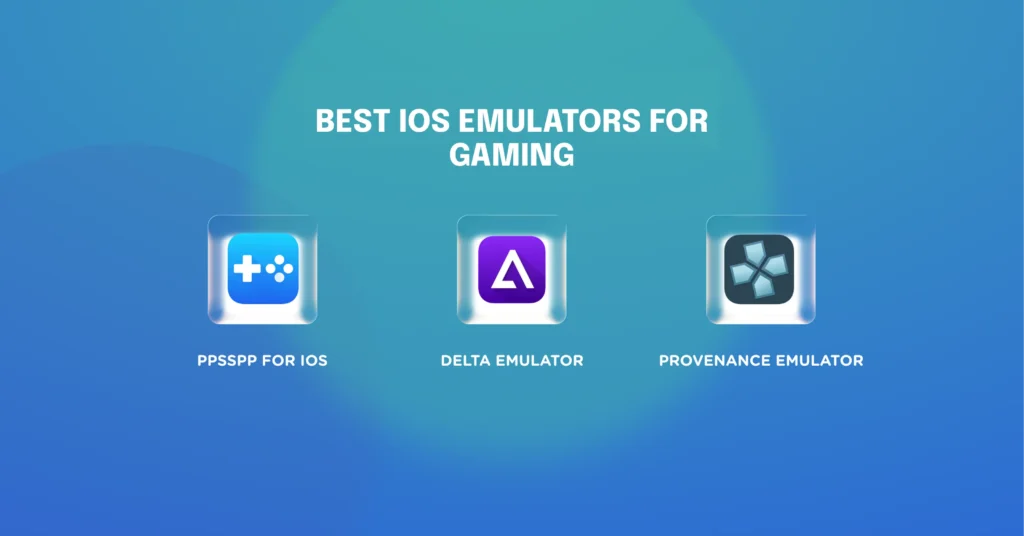
Delta Emulator
Delta continues to dominate the scene as one of the most versatile iOS emulators on the market. It supports a wide range of classic consoles, including NES, SNES, N64, Game Boy, DS, and more. You can pair it with a Bluetooth controller, sync your progress to the cloud, and even stream gameplay via AirPlay.
Delta is also one of the few emulators that plays nice with AltStore—letting you install it without jailbreaking your device.
Provenance Emulator
Provenance is a top pick for users who care about accuracy and retro authenticity. It supports dozens of older systems—from Sega Genesis to Atari—and lets you tweak visuals using filters and custom scaling options. Save states, controller mapping, and flexible UI design make this one a go-to for collectors and enthusiasts.
PPSSPP for iOS
This one’s a beast if you’re into PlayStation Portable gaming. PPSSPP brings smoother graphics, upscaling, and a full feature set—including save state portability and cheat code support. It’s arguably the best PlayStation emulator for iPhone and iPad and works just as well on a larger iPad screen with an external controller.
Are iOS Emulators Legal? Here’s What You Need to Know
ROMs and BIOS Files: Where the Line Gets Blurry
Running an emulator itself isn’t illegal. But the games—or ROM files—you load into it? That’s where things can get tricky. If you don’t own a physical copy of the game, downloading a ROM could be a violation of copyright law. BIOS files, which replicate the console’s firmware, can also raise red flags if not legally sourced.
Pro tip: look for public domain ROMs or sites that offer licensed copies to avoid legal headaches.
Apple Loosens Up—But There’s Still a Catch
Believe it or not, Apple has started letting retro game emulators into the App Store—yes, officially. As long as developers follow a strict set of rules, their apps have a chance to go live. It’s a big shift that’s helping emulators become more mainstream. Still, many of the best options don’t make the cut and end up distributed through third-party platforms like AltStore. This workaround feels oddly similar to how webflow white label solutions let agencies bypass traditional CMS limitations while staying fully branded.
AltStore and Cydia: Still Relevant in 2026—But With Caveats
Alternative app stores like AltStore and Cydia have stuck around, and in 2026, they’re picking up steam again—especially among users who want more control over what they install. They give you access to apps that Apple’s App Store might reject, which is a big deal for emulator fans.
But this freedom comes with trade-offs. These platforms don’t follow Apple’s standard review process, so the responsibility for app stability and data privacy shifts to you. It’s a powerful tool—just make sure you trust the source.
Enhancing the iOS Emulator Gaming Experience
External Controllers
Thanks to innovations in Front-End Technologies, many emulator UIs now adapt dynamically to both desktop and mobile gaming contexts. The right controller can completely change your gaming experience. Many iOS emulators now support Xbox, PlayStation (DualShock/DualSense), and MFi-certified controllers out of the box. These make for a smoother, more responsive gameplay—especially on games that originally relied on physical buttons.
Custom Skins & On-Screen Controls
Prefer touchscreen play? Most modern emulators let you customize your layout with skins, button placements, and even vibration feedback. Some skins replicate original console layouts, while others are optimized for mobile responsiveness and comfort.
These types of UI enhancements often borrow techniques from professional front-end workflows, like those used in react development services york, where mobile-first control and responsiveness are core to the user experience.
Running iPhone Apps Without an Emulator
Emulators aren’t the only way to experience iOS content off-device. In some cases, you might not need one at all.
AirDroid Cast & Apple TV
Tools like AirDroid Cast allow you to mirror your iPhone’s screen to a PC. For a more seamless experience, Apple TV can stream apps or games to a larger screen without third-party software. This can be ideal for presentations or casual gaming without needing a full emulator setup.
Businesses using tools like AirDroid or Apple TV often pair these with white label website builders. For example, when building internal dashboards or mobile-first admin panels, many teams rely on webflow white label setups to match their iOS interface design with responsive web tools.
Same Network Play
For multiplayer scenarios, many retro games allow local play over Wi-Fi—meaning you can sync multiple devices without needing emulators at all. Great for couch co-op sessions or LAN-style mobile setups.
Upcoming iOS Emulators to Watch in 2026
RetroArch, Yaba Sanshiro, Dolphin
Expect big things from this next wave of iOS emulators. RetroArch is already known for its plugin-based system and wide console support. Yaba Sanshiro brings Sega Saturn emulation into the mix, and Dolphin is gearing up for GameCube and Wii emulation with improved iOS compatibility.
What’s Actually Making Emulators Better in 2026
A lot of people are noticing how smooth emulators feel now—but few realize what’s changed under the hood. One of the biggest shifts is the way iOS handles Just-In-Time (JIT) compilation. In plain terms, it allows games—especially heavier ones like PSP or GameCube titles—to run faster and more efficiently, with less impact on your battery.
But the improvements don’t stop at gameplay. We’re also seeing more ambitious emulator-based tools pop up: cloud saves, synced progress across devices, and even full online platforms powered by emulator engines. Building systems like that requires solid infrastructure. That’s where working with a white label Laravel agency comes in—helping developers put together scalable backends without reinventing the wheel.
Built by the Community, Refined by Passion
Emulators don’t get better by accident—they evolve because of dedicated fans and developers who fix bugs, improve graphics, and make obscure games playable again.
Fan Translations
Many beloved classics never had official English releases, but thanks to fan translators, you can now enjoy these hidden gems in your native language. These patches are often made to work directly with specific emulators, bringing niche titles to a broader global audience.
Community Fixes and Tweaks
Projects like Provenance and Delta stay ahead of the curve not because of massive corporate teams, but because their communities care. From visual enhancements to input mapping and bug fixes, many of the features users rely on come from outside contributors who simply love what they’re building.
Even non-native apps that run via web wrappers can be styled to match your brand, especially when supported by an outsourced WordPress team in New York experienced in pixel-perfect custom themes.
Choosing the Best iOS Emulator for Your Needs
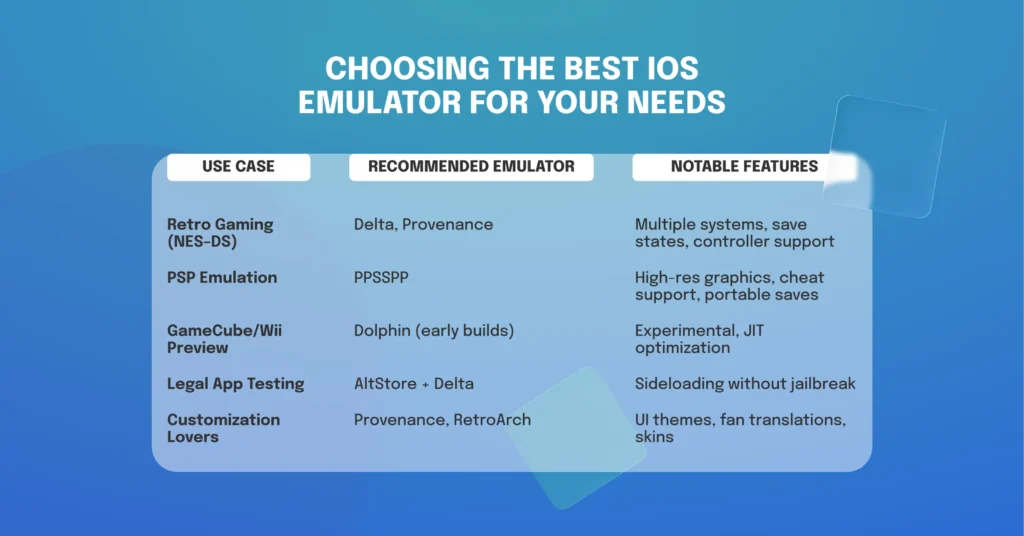
Not all emulators are created equal. Here’s a quick breakdown:
| Use Case | Recommended Emulator | Notable Features |
| Retro Gaming (NES–DS) | Delta, Provenance | Multiple systems, save states, controller support |
| PSP Emulation | PPSSPP | High-res graphics, cheat support, portable saves |
| GameCube/Wii Preview | Dolphin (early builds) | Experimental, JIT optimization |
| Legal App Testing | AltStore + Delta | Sideloading without jailbreak |
| Customization Lovers | Provenance, RetroArch | UI themes, fan translations, skins |
No matter what brings you to iOS emulation—whether it’s nostalgia, experimentation, or early product testing—there’s something out there that fits your needs in 2026.
And if you’re in the early stages of building something new, don’t overlook the value of a lightweight web-based prototype. In fact, many MVP websites work for startups better than fully native apps at the beginning. Paired with the right emulator tools, this approach lets you validate ideas quickly without committing to full development upfront.
Conclusion: The Future of Apple Emulation Is Here
Emulators used to live in the shadows—something you’d hear about on forums or through a friend who was “into that kind of thing.” Not anymore. In 2026, iOS emulation has taken a huge leap forward. Apple’s softened stance on retro gaming, plus the insane work coming out of open-source communities, means these tools are now easier to get, smoother to run, and frankly—just more fun to use.
Still, it’s not a free-for-all. If you’re diving into this space, do it smart: stick with legal ROMs, avoid sketchy download sites, and make sure the emulator you pick actually fits what you’re trying to do—whether that’s testing a build, reliving a childhood favorite, or trying something new on your PC.
Need to test your iOS app or play classic games on your device?
We help startups, developers, and gamers choose and integrate the best iOS emulation tools. Whether you’re looking to sideload your own build or optimize your emulator experience, we can help make it smooth and safe.
Let’s talk!

Free website strategy session with a senior web expert
For over a decade, we’ve helped startups, SaaS companies, and service brands build high-performing websites that drive real results. Whether you’re planning a redesign, launching a new product, or need to scale your platform—our technical and UX expertise can help you move faster and smarter.
Ready to talk? Connect with a lead developer at Hutko.dev for a FREE 30-minute strategy call. Let’s map out your next step, together.
Book a Free Call
